Last updated 26 Sep 2026
The USBProg2 is a in-circuit PIC programmer that delivers just works operation and simplicity of use. The only connections are to a host computer via USB and to the target PIC. No external power is required, but the USBProg2 can still deliver 100 mA Vdd current to the target.
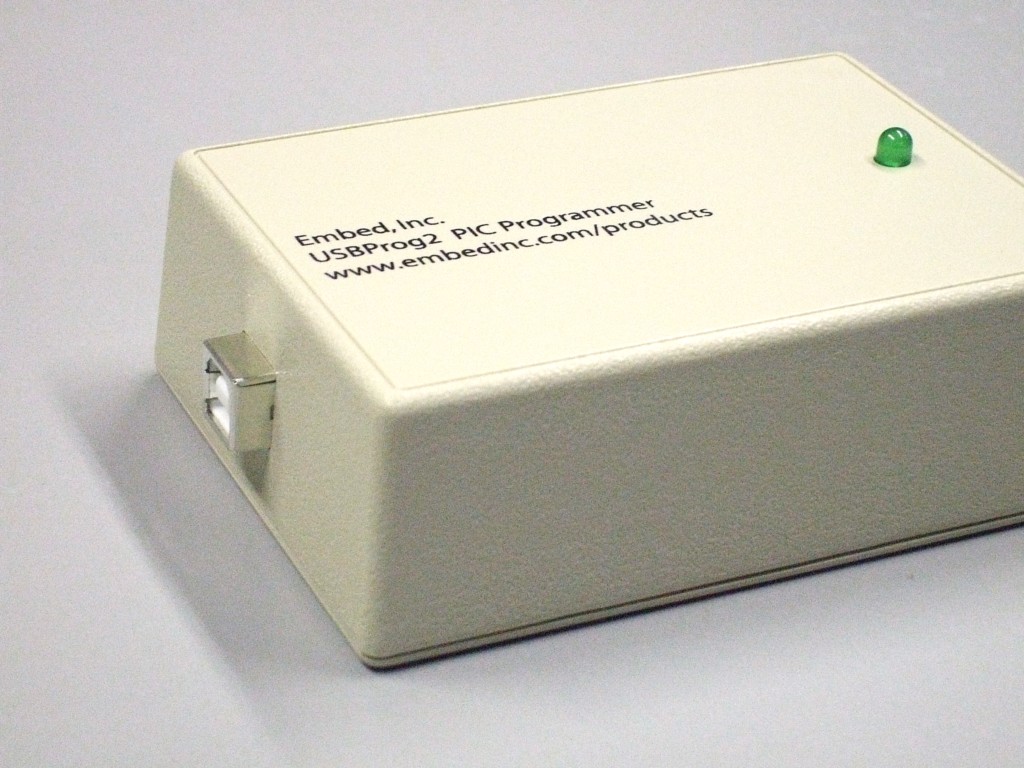
The USBProg2 is the same programmer as the USBProg except in a case. The USBProg2 is intended for field or production use where physical ruggedness is required.
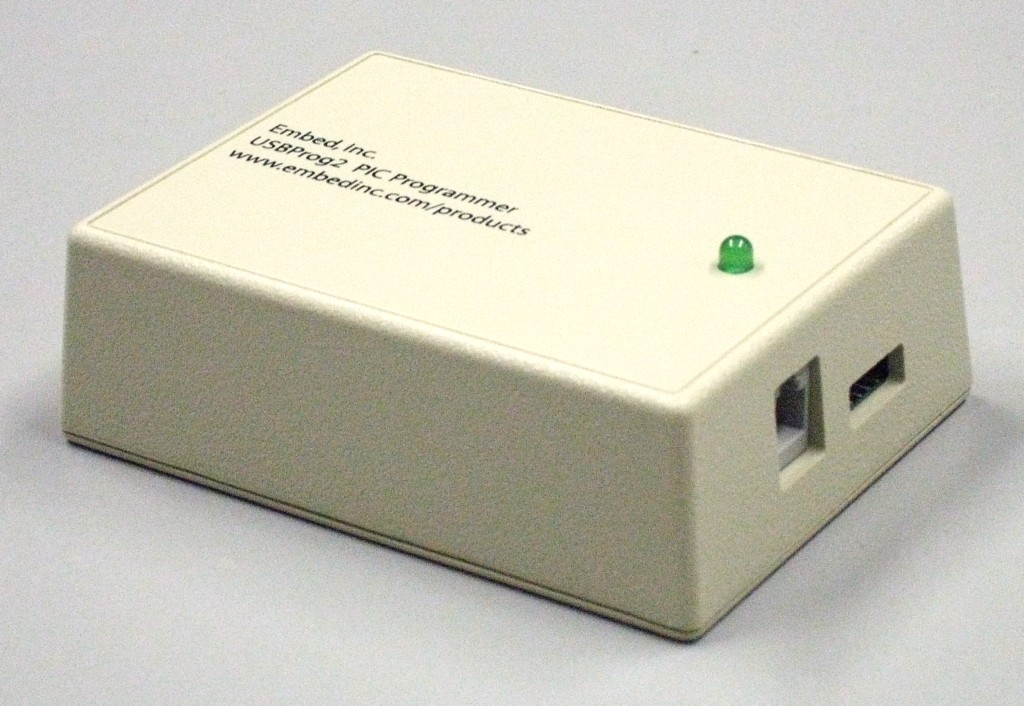
The purchase price is $130 plus shipping. The product package includes one USBProg2 programmer as shown above plus a USB cable for connecting the programmer to a computer.
For shipping to the United States. A flat fee of $20.00 will be charged for shipping and handling the first unit, and $3.00 for each additional unit per order.
For shipping to all other addresses. A flat fee of $40.00 will be charged for shipping and handling the first unit, and $5.00 for each additional unit per order.
The purchase price is $110 per unit plus shipping. Units can only be ordered in packs of 10, for $1100 per pack. Each unit is one USBProg2 as shown above. No USB cable is included.
For shipping to the United States. A flat fee of $25.00 will be charged for shipping and handling the first 10-pack, and $10.00 for each additional 10-pack per order.
For shipping to all other addresses. A flat fee of $50.00 will be charged for shipping and handling the first 10-pack, and $15.00 for each additional 10-pack per order.
The official software is available for free download. Click on the heading above for details.
The USBProg and USBProg2 use the same firmware, and support the same parts. 798 Microchip PIC and dsPIC parts are supported. These are:
10F200 10F202 10F204 10F206 10F220 10F222 12F1501 12F1571 12F1572 12F1822 12F1840 12F508 12F509 12F510 12F519 12F609 12F615 12F617 12F629 12F635 12F675 12F683 12HV609 12HV615 12LF1501 12LF1571 12LF1572 12LF1822 12LF1840 16F1503 16F1507 16F1508 16F1509 16F1512 16F1513 16F1516 16F1517 16F1518 16F1519 16F15213 16F15214 16F15223 16F15224 16F15225 16F15243 16F15244 16F15245 16F15254 16F15255 16F15256 16F1526 16F1527 16F15274 16F15275 16F15276 16F15313 16F15323 16F15324 16F15325 16F15344 16F15345 16F15354 16F15355 16F15356 16F15375 16F15376 16F15385 16F15386 16F1703 16F1704 16F1705 16F1707 16F1708 16F1709 16F1764 16F1765 16F1768 16F1769 16F1782 16F1783 16F1784 16F1786 16F1787 16F1788 16F1789 16F1823 16F1824 16F1825 16F1826 16F1827 16F1828 16F1829 16F18313 16F18323 16F18324 16F18325 16F18326 16F18344 16F18345 16F18346 16F1847 16F505 16F506 16F54 16F59 16F610 16F616 16F627 16F627A 16F628 16F628A 16F630 16F631 16F636 16F648A 16F676 16F677 16F684 16F685 16F687 16F688 16F689 16F690 16F716 16F720 16F721 16F722 16F723 16F724 16F726 16F727 16F73 16F737 16F74 16F747 16F753 16F76 16F767 16F77 16F777 16F818 16F819 16F83 16F84 16F84A 16F87 16F870 16F871 16F872 16F873 16F873A 16F874 16F874A 16F876 16F876A 16F877 16F877A 16F88 16F883 16F884 16F886 16F887 16F913 16F914 16F916 16F917 16F946 16HV610 16HV616 16HV753 16LF1503 16LF1507 16LF1508 16LF1509 16LF1512 16LF1513 16LF1516 16LF1517 16LF1518 16LF1519 16LF1526 16LF1527 16LF15313 16LF15323 16LF15324 16LF15325 16LF15344 16LF15345 16LF15354 16LF15355 16LF15356 16LF15375 16LF15376 16LF15385 16LF15386 16LF1703 16LF1704 16LF1705 16LF1707 16LF1708 16LF1709 16LF1764 16LF1765 16LF1768 16LF1769 16LF1782 16LF1783 16LF1784 16LF1786 16LF1787 16LF1788 16LF1789 16LF1823 16LF1824 16LF1825 16LF1826 16LF1827 16LF1828 16LF1829 16LF18313 16LF18323 16LF18324 16LF18325 16LF18326 16LF18344 16LF18345 16LF18346 16LF1847 16LF720 16LF721 16LF722 16LF723 16LF724 16LF726 16LF727 18F1220 18F1230 18F1320 18F1330 18F1330-ICD 18F13K22 18F13K50 18F14K22 18F14K50 18F2220 18F2221 18F2320 18F2321 18F2331 18F23K20 18F23K22 18F2410 18F242 18F2420 18F2423 18F2431 18F2450 18F2455 18F2458 18F248 18F2480 18F24J10 18F24J11 18F24J50 18F24K20 18F24K22 18F24K50 18F24Q10 18F2510 18F2515 18F252 18F2520 18F2523 18F2525 18F2550 18F2553 18F258 18F2580 18F2585 18F25J10 18F25J11 18F25J50 18F25K20 18F25K22 18F25K80 18F25Q10 18F2610 18F2620 18F2680 18F2682 18F2685 18F26J11 18F26J13 18F26J50 18F26J53 18F26K20 18F26K22 18F26K80 18F26Q10 18F27J13 18F27J53 18F27Q10 18F4220 18F4221 18F4320 18F4321 18F4331 18F43K20 18F43K22 18F4410 18F442 18F4420 18F4423 18F4431 18F4450 18F4455 18F4458 18F448 18F4480 18F44J10 18F44J11 18F44J50 18F44K20 18F44K22 18F4510 18F4515 18F452 18F4520 18F4523 18F4525 18F4550 18F4553 18F458 18F4580 18F4585 18F45J10 18F45J11 18F45J50 18F45K20 18F45K22 18F45K80 18F45Q10 18F4610 18F4620 18F4680 18F4682 18F4685 18F46J11 18F46J13 18F46J50 18F46J53 18F46K20 18F46K22 18F46K80 18F46Q10 18F47J13 18F47J53 18F47Q10 18F6310 18F6390 18F6410 18F6490 18F6520 18F6525 18F6527 18F6585 18F65K22 18F65K80 18F65K90 18F6620 18F6621 18F6622 18F6627 18F6680 18F66J60 18F66J65 18F66K22 18F66K80 18F66K90 18F6720 18F6722 18F67J60 18F67K22 18F67K90 18F8310 18F8390 18F8410 18F8490 18F8520 18F8525 18F8527 18F8585 18F85K22 18F85K90 18F8620 18F8621 18F8622 18F8627 18F8680 18F86J60 18F86J65 18F86K22 18F86K90 18F8720 18F8722 18F87J60 18F87K22 18F87K90 18F96J60 18F96J65 18F97J60 18LF13K22 18LF13K50 18LF14K22 18LF14K50 18LF23K22 18LF24J10 18LF24J11 18LF24J50 18LF24K22 18LF25J10 18LF25J11 18LF25J50 18LF25K22 18LF25K80 18LF26J11 18LF26J13 18LF26J50 18LF26J53 18LF26K22 18LF26K80 18LF27J13 18LF27J53 18LF43K22 18LF44J10 18LF44J11 18LF44J50 18LF44K22 18LF45J10 18LF45J11 18LF45J50 18LF45K22 18LF45K80 18LF46J11 18LF46J13 18LF46J50 18LF46J53 18LF46K22 18LF46K80 18LF47J13 18LF47J53 18LF65K80 18LF66K80 24EP128GP202 24EP128GP204 24EP128GP206 24EP128MC202 24EP128MC204 24EP128MC206 24EP256GP202 24EP256GP204 24EP256GP206 24EP256MC202 24EP256MC204 24EP256MC206 24EP32GP202 24EP32GP203 24EP32GP204 24EP32MC202 24EP32MC203 24EP32MC204 24EP512GP202 24EP512GP204 24EP512GP206 24EP512MC202 24EP512MC204 24EP512MC206 24EP64GP202 24EP64GP203 24EP64GP204 24EP64GP206 24EP64MC202 24EP64MC203 24EP64MC204 24EP64MC206 24F04KA200 24F04KA201 24F04KL100 24F04KL101 24F08KA101 24F08KA102 24F08KL200 24F08KL201 24F08KL301 24F08KL302 24F08KL401 24F08KL402 24F08KM101 24F08KM102 24F08KM202 24F08KM204 24F16KA101 24F16KA102 24F16KL401 24F16KL402 24F16KM102 24F16KM104 24F16KM202 24F16KM204 24FJ128GA006 24FJ128GA008 24FJ128GA010 24FJ128GA106 24FJ128GA108 24FJ128GA110 24FJ128GB106 24FJ128GB108 24FJ128GB110 24FJ16GA002 24FJ16GA004 24FJ192GA106 24FJ192GA108 24FJ192GA110 24FJ192GB106 24FJ192GB108 24FJ192GB110 24FJ256GA106 24FJ256GA108 24FJ256GA110 24FJ256GB106 24FJ256GB108 24FJ256GB110 24FJ32GA002 24FJ32GA004 24FJ32GA102 24FJ32GA104 24FJ32GB002 24FJ32GB004 24FJ48GA002 24FJ48GA004 24FJ64GA002 24FJ64GA004 24FJ64GA006 24FJ64GA008 24FJ64GA010 24FJ64GA102 24FJ64GA104 24FJ64GA106 24FJ64GA108 24FJ64GA110 24FJ64GB002 24FJ64GB004 24FJ64GB106 24FJ64GB108 24FJ64GB110 24FJ96GA006 24FJ96GA008 24FJ96GA010 24FV08KM101 24FV08KM102 24FV08KM202 24FV08KM204 24FV16KM102 24FV16KM104 24FV16KM202 24FV16KM204 24HJ128GP202 24HJ128GP204 24HJ128GP206 24HJ128GP206A 24HJ128GP210 24HJ128GP210A 24HJ128GP306 24HJ128GP306A 24HJ128GP310 24HJ128GP310A 24HJ128GP502 24HJ128GP504 24HJ128GP506 24HJ128GP506A 24HJ128GP510 24HJ128GP510A 24HJ12GP201 24HJ12GP202 24HJ16GP304 24HJ256GP206 24HJ256GP206A 24HJ256GP210 24HJ256GP210A 24HJ256GP610 24HJ256GP610A 24HJ32GP202 24HJ32GP204 24HJ32GP302 24HJ32GP302-QFN 24HJ32GP304 24HJ64GP202 24HJ64GP204 24HJ64GP206 24HJ64GP206A 24HJ64GP210 24HJ64GP210A 24HJ64GP502 24HJ64GP504 24HJ64GP506 24HJ64GP506A 24HJ64GP510 24HJ64GP510A 30F2010 30F2011 30F2011-OLD 30F2012 30F2012-OLD 30F3010 30F3011 30F3012 30F3013 30F3014 30F4011 30F4012 30F4013 30F5011 30F5013 30F5015 30F6010 30F6011 30F6011A 30F6012 30F6012A 30F6013 30F6013A 30F6014 30F6014A 33EP128GM304 33EP128GM306 33EP128GM310 33EP128GM604 33EP128GM706 33EP128GM710 33EP128GP502 33EP128GP504 33EP128GP506 33EP128MC202 33EP128MC204 33EP128MC206 33EP128MC502 33EP128MC504 33EP128MC506 33EP256GM304 33EP256GM306 33EP256GM310 33EP256GM604 33EP256GM706 33EP256GM710 33EP256GP502 33EP256GP504 33EP256GP506 33EP256MC202 33EP256MC204 33EP256MC206 33EP256MC502 33EP256MC504 33EP256MC506 33EP32GP502 33EP32GP503 33EP32GP504 33EP32MC202 33EP32MC203 33EP32MC204 33EP32MC502 33EP32MC503 33EP32MC504 33EP512GM304 33EP512GM306 33EP512GM310 33EP512GM604 33EP512GM706 33EP512GM710 33EP512GP502 33EP512GP504 33EP512GP506 33EP512MC202 33EP512MC204 33EP512MC206 33EP512MC502 33EP512MC504 33EP512MC506 33EP64GP502 33EP64GP503 33EP64GP504 33EP64GP506 33EP64MC202 33EP64MC203 33EP64MC204 33EP64MC206 33EP64MC502 33EP64MC503 33EP64MC504 33EP64MC506 33FJ06GS101 33FJ06GS102 33FJ06GS202 33FJ128GP202 33FJ128GP204 33FJ128GP206 33FJ128GP206A 33FJ128GP306 33FJ128GP306A 33FJ128GP310 33FJ128GP310A 33FJ128GP706 33FJ128GP706A 33FJ128GP708 33FJ128GP708A 33FJ128GP710 33FJ128GP710A 33FJ128GP802 33FJ128GP804 33FJ128MC202 33FJ128MC204 33FJ128MC506 33FJ128MC506A 33FJ128MC510 33FJ128MC510A 33FJ128MC706 33FJ128MC706A 33FJ128MC708 33FJ128MC708A 33FJ128MC710 33FJ128MC710A 33FJ128MC802 33FJ128MC804 33FJ12GP201 33FJ12GP202 33FJ12MC201 33FJ12MC202 33FJ16GP304 33FJ16GS402 33FJ16GS404 33FJ16GS502 33FJ16GS504 33FJ16MC304 33FJ256GP506 33FJ256GP506A 33FJ256GP510 33FJ256GP510A 33FJ256GP710 33FJ256GP710A 33FJ256MC510 33FJ256MC510A 33FJ256MC710 33FJ256MC710A 33FJ32GP202 33FJ32GP204 33FJ32GP302 33FJ32GP304 33FJ32GS406 33FJ32GS606 33FJ32GS608 33FJ32GS610 33FJ32MC202 33FJ32MC204 33FJ32MC302 33FJ32MC304 33FJ64GP202 33FJ64GP204 33FJ64GP206 33FJ64GP206A 33FJ64GP306 33FJ64GP306A 33FJ64GP310 33FJ64GP310A 33FJ64GP706 33FJ64GP706A 33FJ64GP708 33FJ64GP708A 33FJ64GP710 33FJ64GP710A 33FJ64GP802 33FJ64GP804 33FJ64GS406 33FJ64GS606 33FJ64GS608 33FJ64GS610 33FJ64MC202 33FJ64MC204 33FJ64MC506 33FJ64MC506A 33FJ64MC508 33FJ64MC508A 33FJ64MC510 33FJ64MC510A 33FJ64MC706 33FJ64MC706A 33FJ64MC710 33FJ64MC710A 33FJ64MC802 33FJ64MC804
The USBProg2 runs the same firmware as the USBProg. The firmware will be in files named EUSBxx.HEX in the SRC > PICPRG directory within the software installation directory. The latest version is indicated on the software page.
To update the firware in a USBProg2, follow these steps:
pic_progThis will, among other things, display the name of the programmer and its current firmware version. Record the name for use in a later step.
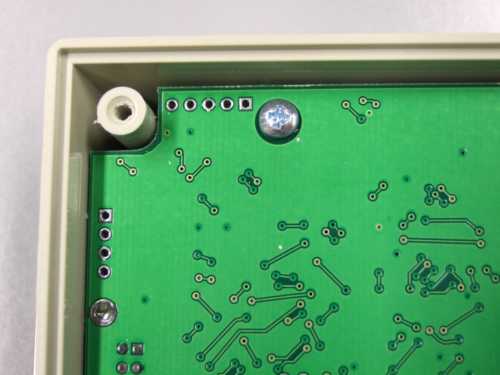
Pin 1 is on the right end and marked by the square pad. The pins are:
1: Vpp
2: Vdd
3: Ground
4: PGD
5: PGC
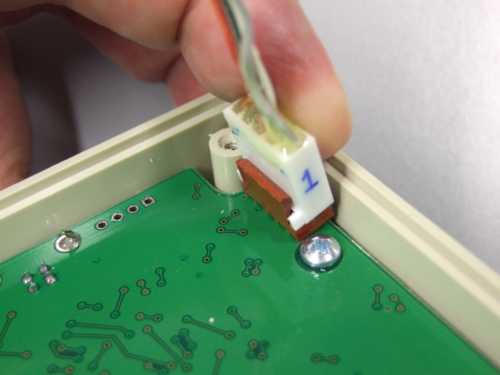
pic_prog (cog)src/picprg/eusbXXWhere XX is replaced by the two digit version number of the firmware you want to update the USBProg2 to.
pic_ctrl -setname namewith name replaced by the name the unit originally had as saved from step 2, above. If the name has spaces in it, then it must be enclosed in quotes.
pic_progThis should verify that the new firmware version is running and that the original name has been restored.